

Absolute paths
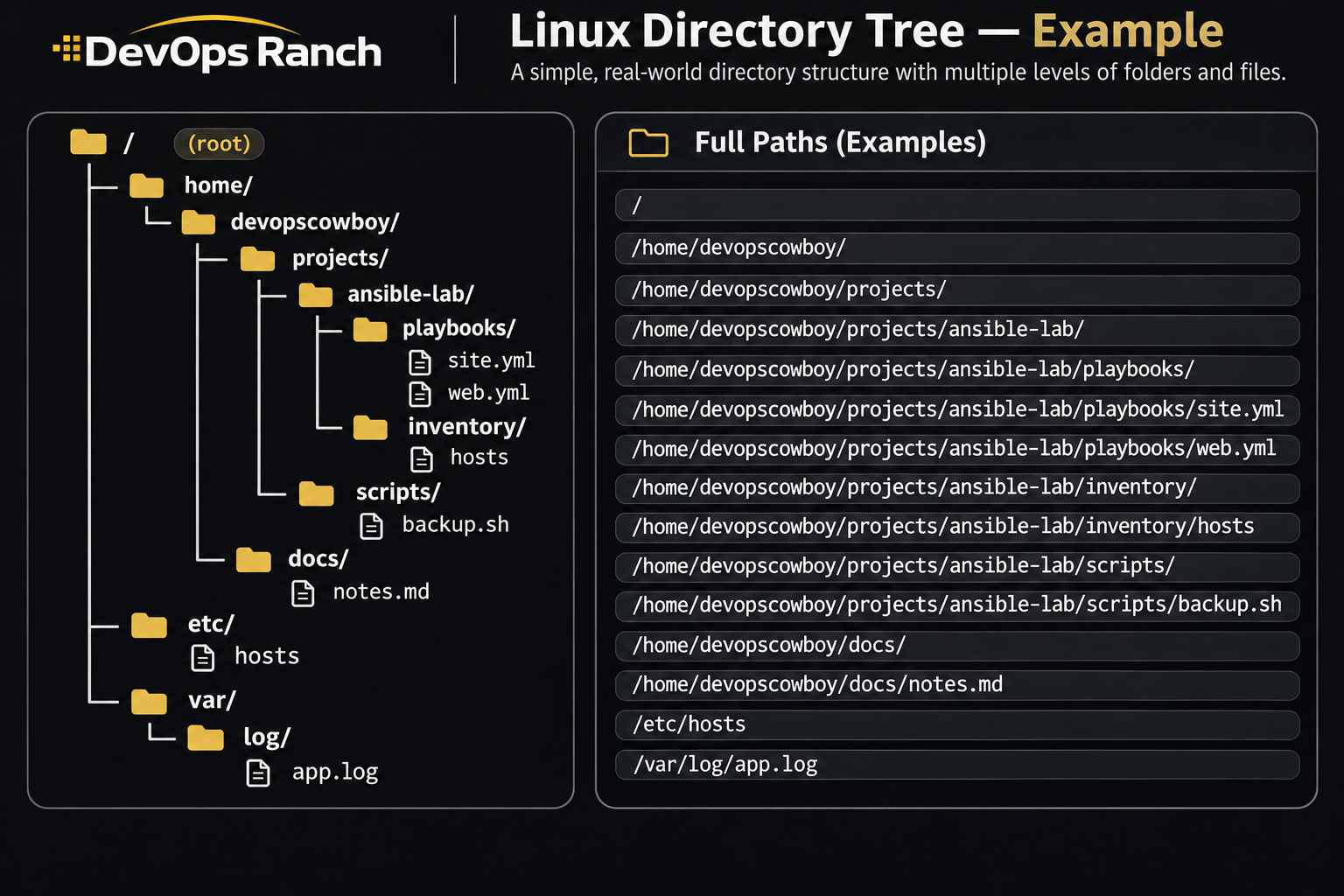
An absolute path starts with /. That slash is the root, the top of the filesystem, and the path lists every directory from there down to the file. It names the same place no matter which directory you are in.
A relative path has no leading /. It starts from the directory you are in now, the one pwd prints.
Cheat sheet
Permissions
Modes, the sticky bit, ACLs, and SELinux labels.
On this page
Permissions
chmod 644 file.txt
chmod 755 script.sh
chmod -R u=rwX,go=rX directory
chmod g+s shared/
chmod +t /shared
chown user:group file
umask
umask 022
setfacl -m u:alice:rwx file
getfacl file
The digits are read=4, write=2, execute=1, summed for owner, group, and everyone else. 644 is rw-r--r--. 755 is rwxr-xr-x.
Capital X adds execute only on directories and on files that are already executable, which is what you want for a recursive grant. chmod -R u=rwX,go=rX sets that in one pass. chown needs root or the capability to change ownership.
chmod g+s on a directory is setgid: new files and directories inherit the directory’s group. chmod +t is the sticky bit: on a shared directory, only the file owner (or root) can delete a file. umask prints the mask subtracted from new files and directories. 022 produces 644 for files and 755 for directories. 002 produces 664 and 775, which is the usual choice for a shared group.
setfacl and getfacl come from the acl package. -m u:alice:rwx grants one user without changing the unix mode everyone else sees. A default ACL, setfacl -d -m u:alice:rwx dir, copies onto new files created in that directory.
usermod -Gwithout-areplaces supplementary groups. That belongs with users, and it is the same kind of surprise as a recursivechmodthat adds execute to every file. Prefer the capitalXform above when the tree mixes files and directories.
SELinux
Install semanage before the semanage lines. RHEL 8, 9, and 10: policycoreutils-python-utils. RHEL 7: policycoreutils-python.
getenforce
sudo setenforce 0
sudo setenforce 1
ls -Z /var/www/html
ps -eZ | grep httpd
sudo semanage fcontext -a -t httpd_sys_content_t '/web(/.*)?'
sudo restorecon -Rv /web
sudo semanage port -a -t http_port_t -p tcp 8081
sudo setsebool -P httpd_can_network_connect on
sudo ausearch -m AVC -ts recent
getenforce prints Enforcing, Permissive, or Disabled. setenforce 0 is permissive until reboot, and only while SELinux is enabled. It does not turn a disabled system on. The lasting switch is SELINUX= in /etc/selinux/config, and moving between disabled and enforcing needs a reboot.
ls -Z is the file context. ps -eZ is the process context. semanage fcontext -a records the default label for a path. The (/.*)? regex is the directory and everything under it. restorecon applies that record to the files. If the path already has a record, -a fails and -m updates it. The same rule applies to semanage port.
setsebool -P flips a boolean and keeps it across reboot. -P rebuilds policy, so it takes longer than a plain setsebool. ausearch -m AVC -ts recent shows denials from the last 10 minutes. Fix the denial with semanage and restorecon, then turn enforcing back on.
chconlabels a file immediately and is forgotten the next time the filesystem is relabeled.mvkeeps the source file’s context, so a file moved into/var/www/htmlcan still beuser_home_t.cpcreates a new inode and picks up the destination’s default. Record the label withsemanage fcontext, then runrestorecon.