

Absolute paths
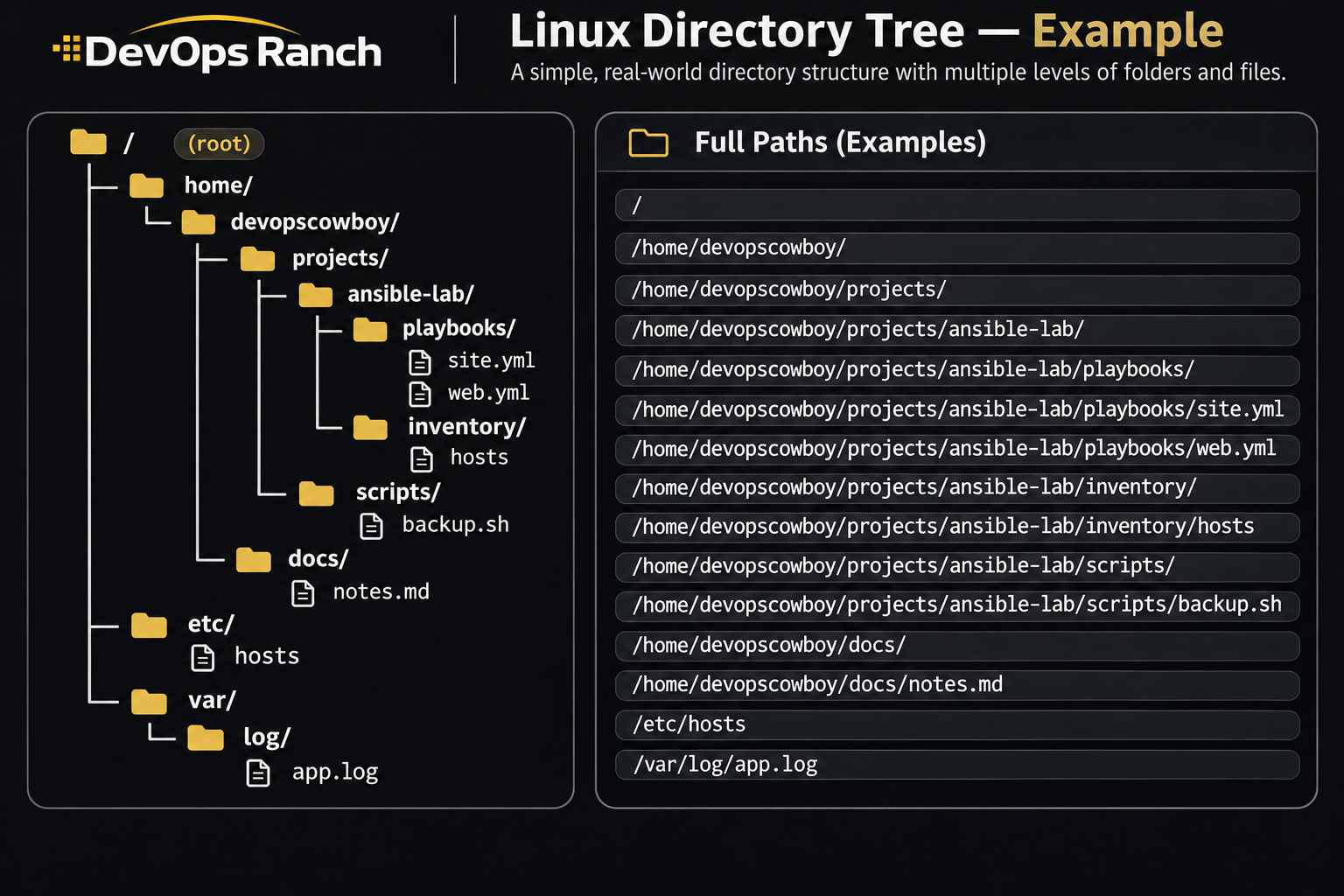
An absolute path starts with /. That slash is the root, the top of the filesystem, and the path lists every directory from there down to the file. It names the same place no matter which directory you are in.
A relative path has no leading /. It starts from the directory you are in now, the one pwd prints.
Cheat sheet
Files and Directories
Create, copy, read, search, and archive files and directories.
On this page
Create, copy, and remove
mkdir - Creates a directory. Use it when you need a new folder for a project. -p creates any missing parent directories along the path, and it does not complain if the directory already exists.
mkdir -p /home/devopscowboy/projects/ansible-lab/playbooks
touch - Creates an empty file, or updates the timestamp if that file already exists. Use it when a file has to exist before you edit it, or when a program only checks that the name is there.
touch notes.md
cat - Prints a whole file to the screen. Use it for a short file, such as /etc/hosts. On a long file the text scrolls past. Use less for those.
cat /etc/hosts
less - Opens a file one screen at a time. Use it for logs and anything longer than a page. The space bar moves forward, q quits, and /pattern searches. On RHEL, general system messages are in /var/log/messages.
less /var/log/messages
cp - Copies a file. The first path is the original and the second is the copy. Use it to keep a backup before you edit. -r copies a directory and everything inside it. -a does that and also keeps permissions, ownership, and times.
cp notes.md notes.md.bak
cp -r playbooks playbooks-copy
mv - Moves a file or directory. That is also how you rename one: the original name is gone, and nothing is left in the old place. Use it to change a name or to put a file in a different folder. If the destination name already exists, mv replaces that file.
mv web.yml site.yml
mv notes.md docs/notes.md
rm - Deletes a file. There is no trash folder, and you cannot undo it. -r deletes a directory and everything inside it. Run ls on the path first so you can see the names you are about to remove.
rm notes.md
rm -r old-playbooks
rm -rfmeans recursive and force. It does not ask, and it deletes a whole tree. Do not point it at/, and do not run it on a path you have not read back to yourself. RHEL’s root shell is often set up to ask beforerm,cp, andmv. A normal user’s shell is not. Do not count on the question. Preferrm -rwithout-fwhile you are learning.
Links
ln -s creates a symbolic link. The first path is the target, the second is the link name. readlink -f prints the path with every symlink resolved. A hard link is a second name for the same file. Hard links stay on one filesystem, and a directory cannot be a hard link.
ln -s /opt/app/releases/v2 /opt/app/current
readlink -f /opt/app/current
ln /etc/passwd /tmp/passwd.name
Read a file
less /var/log/messages
head -n 20 file
tail -n 50 -f /var/log/secure
wc -l file
On RHEL, general system messages go to /var/log/messages, and SSH and sudo go to /var/log/secure. less is the pager: /pattern searches, n finds the next hit, q quits. tail -f follows new lines. tail -F keeps following when the file is rotated and recreated. The journal is the other half of RHEL logging, on Logs and the journal.
Search
grep -n 'pattern' file
grep -RIn 'pattern' .
find . -name '*.log'
find / -name 'sshd_config' 2>/dev/null
grep -n prints the line number. -R searches through directories, -I skips binary files, and the n numbers each hit. find -name matches a file name. 2>/dev/null hides the permission errors find / prints for directories you cannot read.
Archives
tar -czf archive.tar.gz directory
tar -cjf archive.tar.bz2 directory
tar -tzf archive.tar.gz
tar -xzf archive.tar.gz -C /opt
-c creates, -x extracts, -t lists, and -f is the archive name. -f has to be followed by that name. -z is gzip and -j is bzip2. -C /opt extracts into that directory instead of the current one.
Slice a text file
sed -n '10,20p' file
sed -i.bak 's/old/new/g' file
awk -F: '{print $1}' /etc/passwd
cut -d: -f1 /etc/passwd
grep -Ev '^\s*(#|$)' /etc/ssh/sshd_config
sed -n '10,20p' prints that line range and nothing else. sed -i.bak edits in place and keeps file.bak. On RHEL, GNU sed also allows -i with no suffix. awk -F: and cut -d: -f1 both print the first colon-separated field. In /etc/passwd that field is the username.
grep -Ev drops blank lines and lines whose first non-space character is #. It does not strip a comment that follows a setting.