

Absolute paths
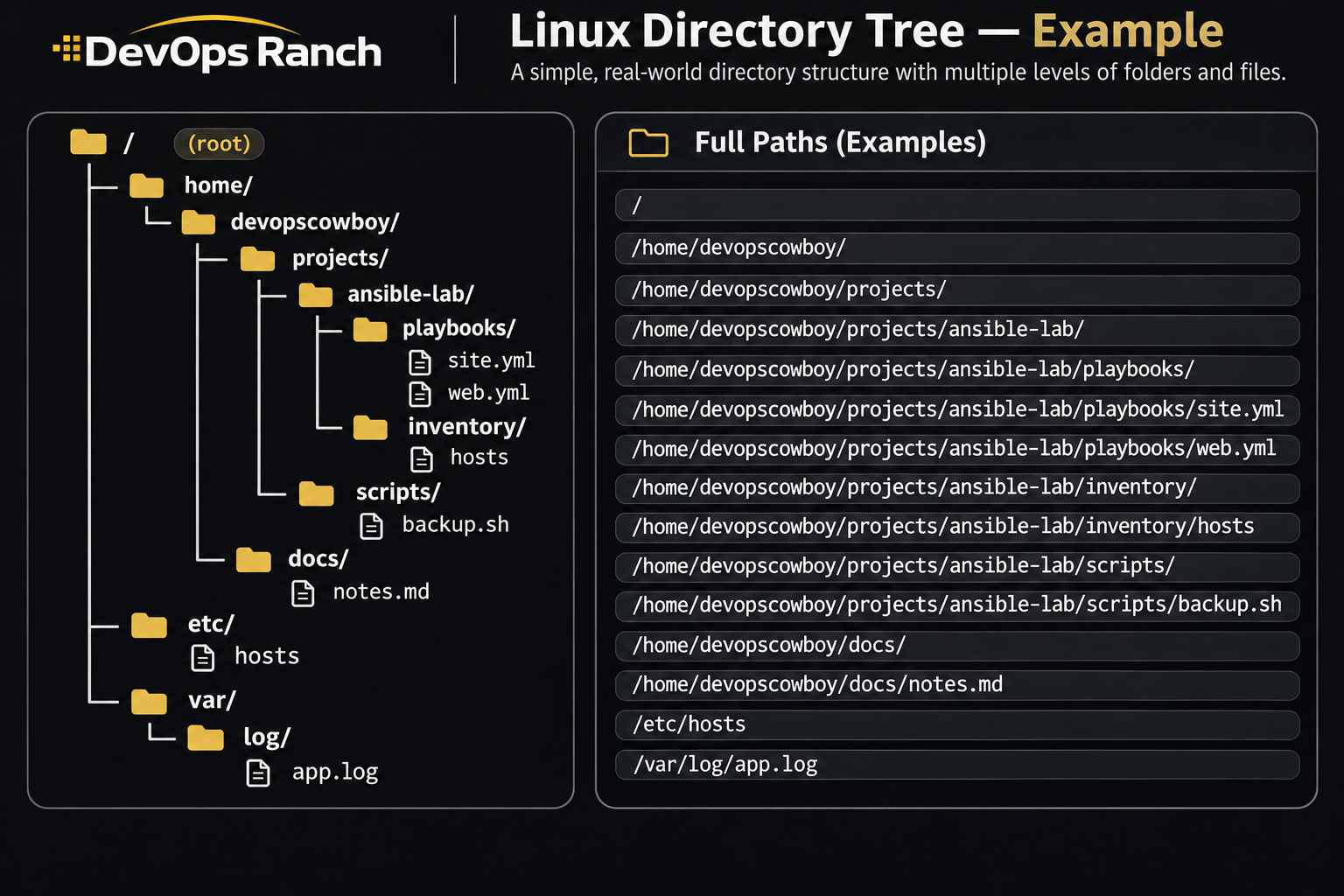
An absolute path starts with /. That slash is the root, the top of the filesystem, and the path lists every directory from there down to the file. It names the same place no matter which directory you are in.
A relative path has no leading /. It starts from the directory you are in now, the one pwd prints.
Cheat sheet
Networking
Addresses, NetworkManager, firewalld, and port checks.
On this page
Networking
ip -br addr
nmcli device status
nmcli connection show
sudo nmcli connection modify "Wired connection 1" ipv4.method manual ipv4.addresses 10.0.0.20/24 ipv4.gateway 10.0.0.1 ipv4.dns 10.0.0.1
sudo nmcli connection up "Wired connection 1"
getent hosts api.internal
dig +short example.com
timeout 3 bash -c 'echo >/dev/tcp/db.internal/5432'
curl -I https://example.com
ip -br addr is one line per interface. nmcli is the command on RHEL 7, 8, 9, and 10, and it stores the connection so it survives reboot. Replace the connection name with one from nmcli connection show. On RHEL 9 and 10, nmcli writes a keyfile under /etc/NetworkManager/system-connections/. getent hosts looks up a name the way an application does, including /etc/hosts. dig asks DNS only.
The bash -c line is the port check. It needs no extra package. A successful /dev/tcp open exits 0, and timeout keeps a filtered port from hanging the shell. curl -I fetches headers only.
RHEL 7 and RHEL 8 also read ifcfg files. On RHEL 9 and 10, use nmcli. This is /etc/sysconfig/network-scripts/ifcfg-enp1s0. It is a file, not a shell command. The keys match the RHEL 7 networking guide, plus GATEWAY and DNS1 from nm-settings-ifcfg-rh(5), which that guide points at.
DEVICE=enp1s0
BOOTPROTO=none
ONBOOT=yes
IPADDR=10.0.0.20
PREFIX=24
GATEWAY=10.0.0.1
DNS1=10.0.0.1
sudo ifup enp1s0
ifup and ifdown are the network-scripts commands on RHEL 7 and 8.
Firewall (firewalld)
sudo firewall-cmd --list-all
sudo firewall-cmd --get-services
sudo firewall-cmd --permanent --add-service=http
sudo firewall-cmd --permanent --add-port=8080/tcp
sudo firewall-cmd --reload
sudo firewall-cmd --list-all --permanent
--list-all is the running zone: services, ports, and rich rules. --get-services prints the names --add-service accepts, including http and https. --permanent writes the on-disk config and does not change the running firewall. --reload replaces the running config with the permanent one.
The other order is to test a runtime change and then save it:
sudo firewall-cmd --add-service=http
sudo firewall-cmd --runtime-to-permanent
firewalld is the default firewall on RHEL 7, 8, and 9. The commands above are the same on all three.
RHEL 7’s other firewall is the iptables service from iptables-services. RHEL 8 still has that package, and its docs say to run only one of firewalld, nftables, or iptables. The rules file is /etc/sysconfig/iptables.
sudo systemctl disable firewalld
sudo systemctl stop firewalld
sudo yum install -y iptables-services
sudo systemctl enable iptables
sudo systemctl start iptables
sudo iptables -L -n -v
sudo iptables -A INPUT -p tcp --dport 80 -j ACCEPT
sudo iptables-save | sudo tee /etc/sysconfig/iptables
sudo service iptables save
service iptables save is the RHEL 7 service action. It writes the same /etc/sysconfig/iptables file. dnf install iptables-services is the RHEL 8 package command.
A firewalld rule without
--permanentdisappears at the next reload. A--permanentrule does nothing to current traffic until you reload. After either change, check--list-alland a connection from outside the host, not only from localhost. Do not run theiptablesservice andfirewalldon the same host. RHEL 8 says the firewall services influence each other, so run only one.