

Absolute paths
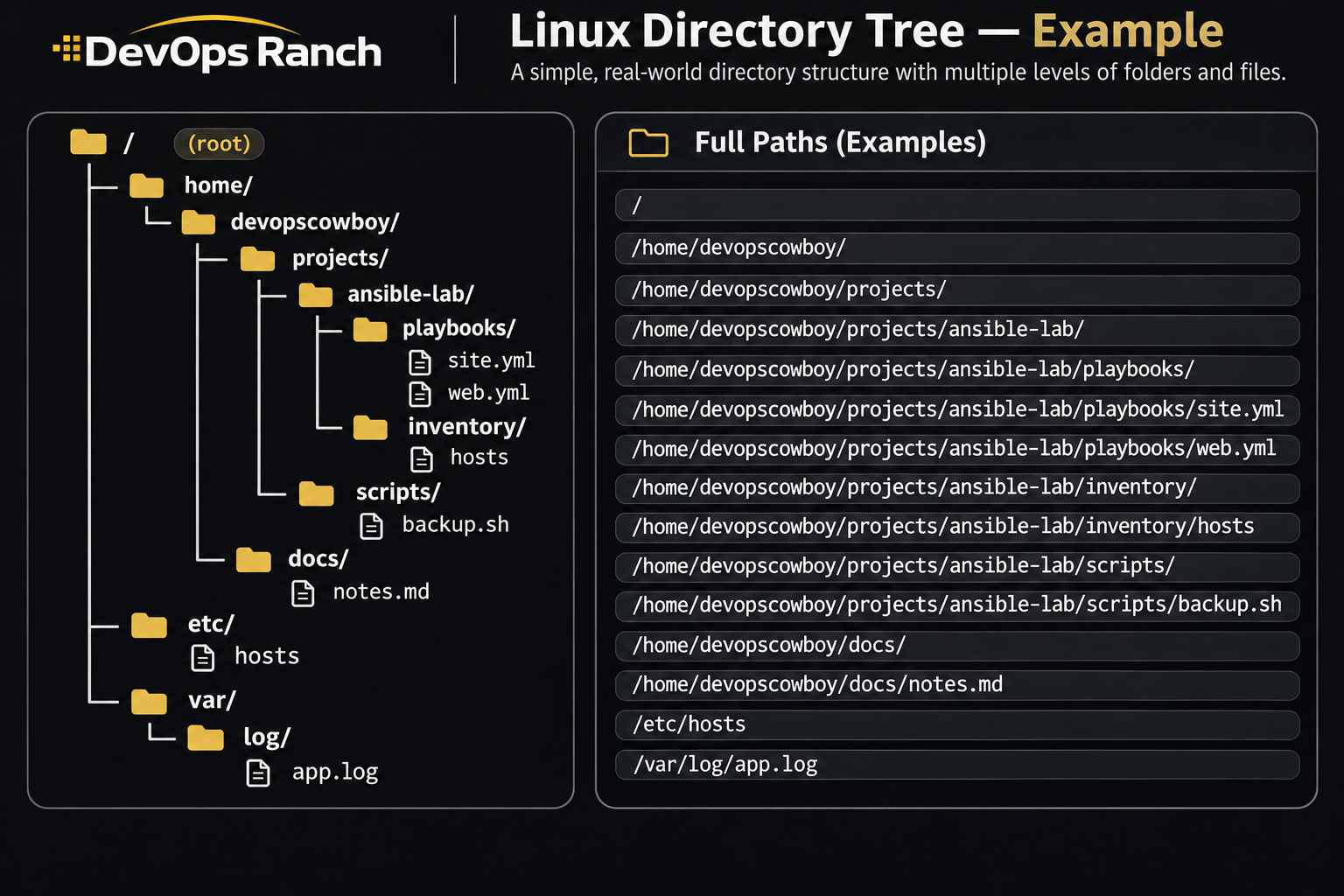
An absolute path starts with /. That slash is the root, the top of the filesystem, and the path lists every directory from there down to the file. It names the same place no matter which directory you are in.
A relative path has no leading /. It starts from the directory you are in now, the one pwd prints.
Labs
Linux
Hands-on RHCSA labs. Each one matches a lesson and runs on your own RHEL VM.
On this page
A lab is a task you do on your own RHEL virtual machine. Nothing here connects to your machine. You type the commands, then check your work, and open the solution only after you have tried.
Each lab matches one lesson. Read the lesson first if a word in the task is new. Rows marked coming soon do not have a lab page yet.
The lessons are on the Linux lesson track.
Basics
The filesystem, the shell prompt, and where help lives on the host.
- 01 The filesystem and absolute paths Read the directory tree, and tell an absolute path from a relative path.
- 02 A shell prompt and the first commands Access a shell prompt and issue commands with correct syntax.
-
03 System documentation Locate, read, and use system documentation including man, info, and files in /usr/share/doc. Coming soon
Files & text
Move bytes around, then read and change what is in a file.
-
04 Redirection Use input-output redirection (>, >>, |, 2>, and so on). Coming soon
-
05 Search with grep Use grep and regular expressions to analyze text. Coming soon
-
06 Create and edit text files Create and edit text files. Coming soon
-
07 Files and directories Create, delete, copy, and move files and directories. Coming soon
-
08 Hard and soft links Create hard and soft links. Coming soon
-
09 Archives Archive, compress, unpack, and uncompress files using tar, gzip, and bzip2. Coming soon
Users & groups
Accounts, SSH, and moving a file to another host.
-
10 Access a remote system with SSH Access remote systems using SSH. Coming soon
-
11 Log in and switch users Log in and switch users in multi-user targets. Coming soon
-
12 Local user accounts Create, delete, and modify local user accounts. Coming soon
-
13 Passwords and aging Change passwords and adjust password aging for local user accounts. Coming soon
-
14 Groups and membership Create, delete, and modify local groups and group memberships. Coming soon
-
15 Privileged access Configure privileged access. Coming soon
-
16 SSH keys Configure key-based authentication for SSH. Coming soon
-
17 Copy files between systems Securely transfer files between systems. Coming soon
Permissions
Who can read, change, and enter a file.
-
18 Permissions List, set, and change standard ugo/rwx permissions. Coming soon
-
19 Default permissions Manage default file permissions. Coming soon
-
20 Permission problems Diagnose and correct file permission problems. Coming soon
Processes
What is running, and how much of the machine it may use.
-
21 Processes Identify CPU and memory intensive processes and kill processes. Coming soon
-
22 Process priority Adjust process scheduling. Coming soon
-
23 Tuning profiles Manage tuning profiles. Coming soon
Storage
Disks, LVM, filesystems, and the mounts that survive a reboot.
-
24 GPT partitions List, create, and delete partitions on GPT disks. Coming soon
-
25 Physical volumes Create and remove physical volumes. Coming soon
-
26 Volume groups Assign physical volumes to volume groups. Coming soon
-
27 Logical volumes Create and delete logical volumes. Coming soon
-
28 Mount by UUID or label Configure systems to mount file systems at boot by universally unique ID (UUID) or label. Coming soon
-
29 Add storage without destroying data Add new partitions and logical volumes, and swap to a system non-destructively. Coming soon
-
30 VFAT, ext4, and XFS Create, mount, unmount, and use VFAT, ext4, and XFS file systems. Coming soon
-
31 NFS Mount and unmount network file systems using NFS. Coming soon
-
32 autofs Configure autofs. Coming soon
-
33 Extend a logical volume Extend existing logical volumes. Coming soon
Networking
An address, a name, and a firewall that still exists after reboot.
-
34 IPv4 and IPv6 addresses Configure IPv4 and IPv6 addresses. Coming soon
-
35 Hostname resolution Configure hostname resolution. Coming soon
-
36 Start networking at boot Configure network services to start automatically at boot. Coming soon
-
37 firewalld Restrict network access and configure firewall settings using firewalld and firewall-cmd. Coming soon
Services & boot
Boot the host, keep a service up, and read what it logged.
-
38 Boot, reboot, and shut down Boot, reboot, and shut down a system normally. Coming soon
-
39 Switch targets by hand Boot systems into different targets manually. Coming soon
-
40 Reset a lost root password Interrupt the boot process in order to gain access to a system. Coming soon
-
41 Logs and the journal Locate and interpret system log files and journals. Coming soon
-
42 Keep the journal across reboots Preserve system journals. Coming soon
-
43 Network service status Start, stop, and check the status of network services. Coming soon
-
44 at, cron, and timers Schedule tasks using at, cron, and systemd timer units. Coming soon
-
45 Enable a service at boot Start and stop services and configure services to start automatically at boot. Coming soon
-
46 Default boot target Configure systems to boot into a specific target automatically. Coming soon
-
47 Time synchronization Configure time service clients. Coming soon
-
48 The bootloader Modify the system bootloader. Coming soon
Packages
RPM, Flatpak, and installing from a repo or a local file.
-
49 RPM repositories Configure access to RPM repositories. Coming soon
-
50 Install and remove RPM packages Install and remove RPM software packages. Coming soon
-
51 Flatpak repositories Configure access to Flatpak repositories. Coming soon
-
52 Install and remove Flatpak packages Install and remove Flatpak software packages. Coming soon
-
53 Install and update software Install and update software packages from Red Hat Content Delivery Network, a remote repository, or from the local file system. Coming soon
Shell scripts
A short bash script that takes arguments and makes a decision.
-
54 Conditions in a script Conditionally execute code (if, test, [], and so on). Coming soon
-
55 Loops Use looping constructs (for, and so on) to process file and command-line input. Coming soon
-
56 Script arguments Process script inputs ($1, $2, and so on). Coming soon
-
57 Command output in a script Process the output of shell commands within a script. Coming soon
SELinux
Modes, contexts, ports, and booleans. Firewalld is the networking lesson.
-
58 Enforcing and permissive Set enforcing and permissive modes for SELinux. Coming soon
-
59 File and process context List and identify SELinux file and process context. Coming soon
-
60 Restore file contexts Restore default file contexts. Coming soon
-
61 SELinux port labels Manage SELinux port labels. Coming soon
-
62 SELinux booleans Use Boolean settings to modify system SELinux settings. Coming soon